Supercharge Your Git Workflow with These Tools
Created on 21 October, 2025 • Developer Tools • 428 views • 3 minutes read
In today’s development landscape, optimizing your workflow is crucial for maintaining productivity and enhancing project efficiency. The command-line interface (CLI) presents an unmatched level of control, but it can also become overwhelming without the right tools. Among these tools, Lazygit and LazyDocker stand out as game-changers, providing a more intuitive interface to manage Git and Docker operations. This article will guide you through supercharging your Git workflow using these fantastic CLI tools.
Understanding CLI Tools
Command-Line Interface (CLI) tools are applications that you interact with via text commands rather than a graphical user interface (GUI). While higher-level languages have introduced various IDEs and GUIs for ease of use, mastering CLI tools remains essential for developers. Lazygit and LazyDocker streamline processes like version control and deployment management, offering a faster, more efficient way to handle common tasks.
Why Use Lazygit?
Lazygit is a simple yet powerful terminal-based UI for Git. It provides a visual representation of your Git status, making it easier to manage branches, commits, and merges. Here are some compelling reasons to incorporate Lazygit into your workflow:
- User-Friendly Interface: It presents a clean and intuitive UI that reduces the complexity of Git operations.
- Quick Navigation: Effortlessly switch between branches, stage files, and commit changes without needing to memorize commands.
- Efficient Conflict Resolution: Lazygit simplifies the process of handling merge conflicts, allowing you to resolve issues with ease.
1. Getting Started with Lazygit
To get started with Lazygit, follow these steps:
- Install Lazygit: You can install Lazygit via package managers like Homebrew on macOS or APT on Ubuntu. For Windows, you can download binaries from the official repository.brew install lazygit
- Navigate to Your Git Repository: Open a terminal and navigate to your Git repository. Start Lazygit by simply typing the command:lazygit
- Explore the Interface: Familiarize yourself with the Lazygit interface. Spend time navigating through the available panels, including the 'Files', 'Commits', and 'Branches' sections.
- Perform Git Operations: Experiment with staging changes, making commits, and switching branches using the interface to see how Lazygit simplifies these processes.
2. LazyDocker
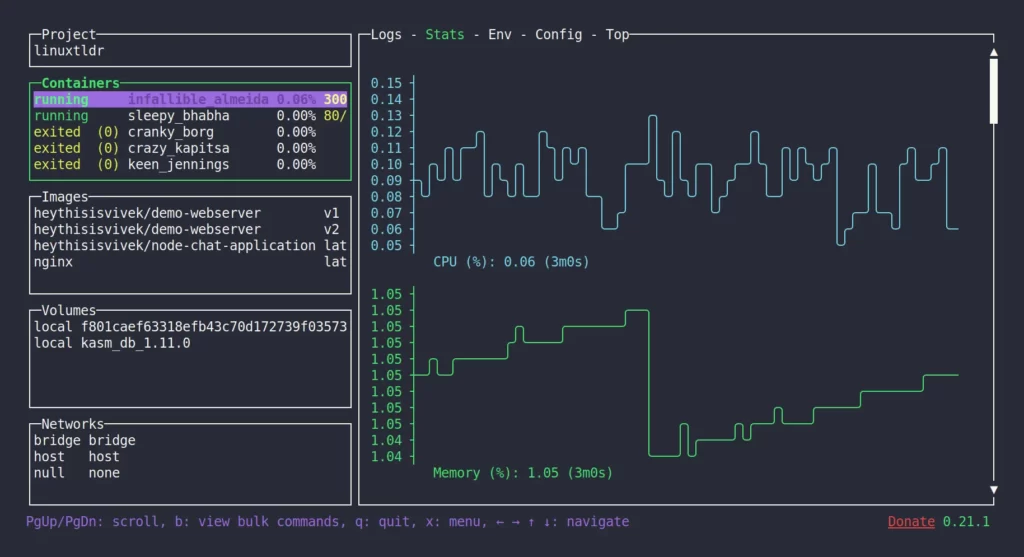
While Lazygit enhances your Git operations, LazyDocker provides similar functionalities for Docker. This tool allows you to manage your containers, images, and volumes efficiently from the terminal. Key features include:
- Real-time Monitoring: Get instant insights into your container states and logs without leaving your terminal.
- One-Stop Management: Control all your Docker resources from a single interface, reducing the clutter typically associated with Docker CLI commands.
- Quick Actions: Execute commands such as starting, stopping, and removing containers with just a few key presses.
Boosting Your Productivity
To truly harness the power of Lazygit and LazyDocker, consider the following strategies:
- Keyboard Shortcuts: Familiarize yourself with the available keyboard shortcuts for both tools. They significantly speed up navigation and operations, allowing you to focus on coding instead of cumbersome commands.
- Regular Updates: Keep your tools updated to benefit from the latest features and bug fixes. Both Lazygit and LazyDocker frequently release updates that can enhance functionality.
- Workflow Customization: Personalize the configuration settings to suit your preferences. Customize keybindings, colors, and layouts to create your ideal working environment.
Integrating Lazygit and LazyDocker
Combining Lazygit and LazyDocker can significantly streamline your development workflow. When working on projects that involve both version control and container management, consider the following tips:
- Interlinked Commands: Use Lazygit for version control of your Docker configurations and manage the actual running containers through LazyDocker.
- Simplified CI/CD: An optimized integration allows for smoother continuous integration and deployment processes. After a successful commit in Lazygit, switch to LazyDocker to manage deployment smoothly.
- Documentation and SOPs: Create documentation for using Lazygit and LazyDocker together, specifying standard workflows for you and your team. This can lead to consistency and efficiency in project management.
Best Practices for a Streamlined Workflow
To maximize your efficiency with Lazygit and LazyDocker, consider these best practices:
- Regular Commits: Commit your work regularly using Lazygit to create a more manageable history. This practice also minimizes merge conflicts.
- Use Branches Wisely: When working on new features, use feature branches to isolate changes. This approach helps maintain a clean main branch for production.
- Maintain Docker Images: Regularly clean up unused Docker images and containers to save disk space and keep your environments organized.
Conclusion
Supercharging your Git workflow with Lazygit and LazyDocker brings a new level of efficiency and simplicity to your development process. By fully utilizing the features of these powerful CLI tools, you can streamline your version control and container management efforts. Investing time to master these tools and integrating them into your daily workflows will undoubtedly lead to enhanced productivity and a smoother development experience.
Embrace the power of Lazygit and LazyDocker, and transform how you manage projects from the command line today!